

An answer-focused FAQ page is a must-have for small businesses. It directly addresses customer concerns – like pricing, shipping, and returns – at the moment they’re deciding to buy. These pages save time, build trust, and boost conversions by providing clear, concise answers (2–4 sentences) to common questions.
Why does this matter?
- 82% of customers prefer self-service support.
- A strong FAQ page can reduce support tickets and operational costs.
- Businesses like Unity saved $1.3M in one year by improving their FAQ system.
For small businesses, tools like Turbify make it simple to create FAQs that are easy to navigate, mobile-friendly, and optimized for search engines. Focus on relevant categories like payments, shipping, and security, and keep answers short and direct. Regularly update your FAQ to reflect changes in policies or customer inquiries. A well-maintained FAQ isn’t just helpful – it’s a powerful sales tool.
Building Blocks of a Lead-Generating FAQ Page
Core Elements of High-Converting FAQs
The best FAQ pages stick to the "CCF" principle – Clear, Concise, and Factual. Keep answers short and easy to scan, ideally between 40–80 words. As Montana Thomas from Quick Sprout puts it:
"FAQ pages play a key role in converting customers".
This means your FAQ isn’t just a place to answer questions – it’s a sales tool that helps eliminate doubts at the critical moment when someone is deciding whether to make a purchase.
Focus on addressing questions that might stop someone from buying, like pricing, shipping, returns, and warranties. Use features like accordions or collapsible sections so users can quickly find the answers they need without scrolling endlessly . Ann Smarty from Moz emphasizes:
"The golden rule of marketing has always been: Don’t leave your customer wondering, or you’ll lose them".
Once you’ve nailed the structure, it’s time to cover the topics that matter most to your audience.
Common FAQ Topics for Small Businesses
For small businesses catering to U.S. customers, your FAQ should address the essentials. Start with pricing and payment details: What payment methods do you accept? Are there financing options or payment plans? What about extra fees or taxes? Be sure to display prices clearly in U.S. dollars.
Next, cover shipping and delivery: How long does standard shipping take? Do you ship to all 50 states? What are the shipping costs? Is local pickup available? For businesses with physical locations, don’t forget to include practical details like parking information, hours of operation, and service areas.
Finally, round out your FAQ with other critical categories:
- Service and product details: Address compatibility, warranty information, or product-specific questions.
- Trust and security: Highlight return policies and how customer data is protected.
- Technical support: Offer guidance on common issues, like resetting passwords or contacting support.
Interestingly, FAQ pages often rank as the third most-visited page on a website, right after the About and Contact pages. This makes them a direct driver of conversions.
With these topics in mind, you can take your FAQ to the next level by integrating it with Turbify’s tools.
Aligning FAQ Content with Turbify Sites

Using Turbify’s features, you can strategically position your FAQ content to maximize its impact. Turbify’s website builder allows you to add FAQ sections exactly where customers need them – on your homepage, product pages, or even within the checkout flow. For example, if you’re using Turbify’s WooCommerce hosting, place FAQs about shipping and return policies directly on product pages to make critical information easily accessible.
You can also link specific FAQ answers to relevant Turbify tools. For instance:
- Connect domain-related questions to your DNS management dashboard.
- Direct payment inquiries to your secure checkout system.
- Link email-related FAQs to your business email setup page.
Maddie Hoffman, Director of Self-Service and Automation at Zendesk, highlights the value of this approach:
"Having an FAQ page is a way to be more proactive and predictive with what your customers or clients are going to need help with. It’s also an opportunity to direct customers to the next step".
Additionally, Turbify’s built-in SEO tools make it easy to add FAQPage schema markup to your content, helping search engines understand your Q&A format. This can even earn you rich snippets in search results . By leveraging these tools, your FAQ page becomes more than just a help resource – it transforms into a key part of your sales strategy.
Building Your Small Business FAQ Template
Grouping Questions by Category
Start by sorting your questions into clear, easy-to-navigate categories. For small businesses, common groupings might include Ordering & Payment (covering things like accepted payment methods, financing options, and sales tax), Shipping & Delivery (details on delivery times, costs, and tracking orders), Returns & Refunds (return policies, return shipping costs, and refund timelines), Account & Security (password resets, privacy policies), and Product or Service Details (warranties, size guides, or troubleshooting tips).
If you have more than 15 questions, break them into sections to keep the page manageable and user-friendly. Aim for five to seven questions per category to make scanning easier. If your business has a physical location, consider adding a Local Business Info category that includes details like operating hours, parking, and reservation policies.
Use descriptive, keyword-rich headers for your categories. Instead of vague titles like "General Information", try specific ones like "How to Track Your Order" or "Our Return Policy." For longer FAQ pages, adding anchor links at the top can help visitors jump directly to the section they need. Once your questions are categorized, focus on writing answers that are clear and concise.
Writing Clear and Direct Answers
When crafting answers, keep them short and to the point, with the most important information right at the beginning. Stick to two to four sentences for each answer. For example, instead of saying, "We offer several shipping options to meet your needs", go straight to the details: "Standard shipping is $7.99 for orders under $50 and takes 3–5 business days."
Use simple, conversational language that matches how your customers might phrase their questions. Highlight each question with bold text to make scanning easier. For more complex topics, such as returning items or creating an account, consider adding visual aids like GIFs or short videos to make the process easier to follow.
Include internal links to direct users to relevant pages, and provide clear instructions for contacting live support through chat, email, or phone if their question isn’t answered. As Lightspeed advises, "Answers in your FAQ section should be concise. Think as brief as possible while thoroughly answering each question." Once your answers are polished, tweak the formatting to align with U.S. preferences.
Formatting for U.S. Customers
After organizing your categories and writing direct answers, format your FAQ page to meet the expectations of U.S. customers. For prices, always use dollar signs and decimals (e.g., $49.99). When discussing shipping timelines, refer to business days instead of calendar days, and specify coverage – for example: "We ship to all 50 states using USPS and UPS. Standard shipping takes 3–5 business days."
Stick to imperial units (feet, inches, pounds, ounces) instead of metric measurements. If temperature is mentioned, such as for storage or product specifications, express it in Fahrenheit (e.g., "Store at room temperature, between 68°F and 72°F"). Use U.S. date formatting (month/day/year) and 12-hour time with AM/PM (e.g., "Customer support is available Monday–Friday, 9:00 AM to 6:00 PM EST").
To keep your FAQ visually appealing and easy to navigate, use collapsible sections or accordions for each category. This avoids overwhelming visitors with a long block of text. If your FAQ includes more than 20–25 questions, add a search bar at the top to help users quickly find what they’re looking for. This small addition can make a big difference in user experience.
Episode 205: How to Turn Your FAQ Page Into a Lead-Generating Machine with AI
sbb-itb-7459f5e
Adding FAQs to Your Turbify Website
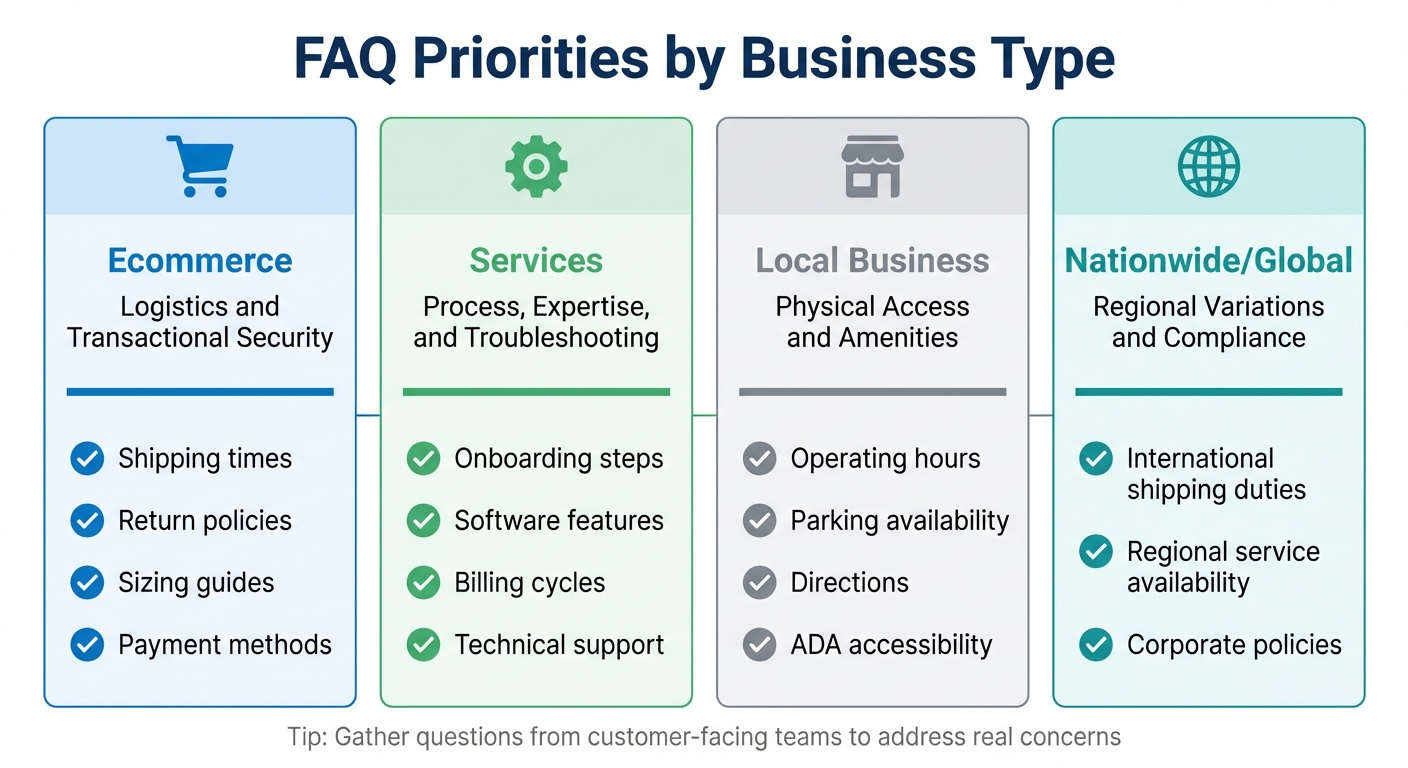
FAQ Content Priorities by Business Type for Small Businesses
Designing for Mobile and Desktop
Creating an FAQ page that works seamlessly on both mobile and desktop starts with a responsive, user-friendly layout. To begin, log in to your Turbify Manage Site dashboard, click Edit site, and navigate to the page where you want to include your FAQ section. From there, click the Add section icon and select a layout designed for Q&A content, like an accordion or a list block.
Accordions are particularly helpful for mobile users, as they allow visitors to tap and reveal answers without excessive scrolling. For the best user experience, ensure that interactive elements like accordion toggles are at least 44 points in size for easy tapping on phones or tablets. Keep your body text at a minimum of 16px to make it readable on smaller screens. If you plan to reuse the same FAQ section across multiple pages, simply click the colon icon on the original section, choose Copy Section, navigate to the new page, and click [Paste] at the bottom of the "Add a new section" column.
For FAQ pages with over 20–25 questions, consider adding a search bar at the top. Research shows that about 70% of customers prefer finding answers directly on a company’s website instead of reaching out to customer support. Once your FAQ section is complete, click Publish to make the updates live on your site.
After setting up a responsive design, the next step is to customize your FAQ content to align with your business needs.
Tailoring FAQs to Your Business Model
The content of your FAQ section should reflect the specific needs of your customers, which vary depending on what you offer. For ecommerce businesses, focus on questions about logistics and transactions. Highlight topics like shipping costs, return policies, sizing guides, payment methods, and stock availability. These are the details online shoppers often look for before making a purchase.
If you run a service-based business or software company, your FAQ should address onboarding, product features, billing cycles, and troubleshooting. These customers are often evaluating how well your service fits their needs and how easy it is to use. Linking answers to relevant pages can also help guide them toward conversions.
For local businesses with physical locations, prioritize details about accessibility and immediate service availability. Include information like operating hours, parking options, directions, ADA accessibility, and any amenities specific to your location. If you operate multiple locations, create separate FAQ sections for each branch to address location-specific questions, such as unique hours or services. For businesses with a broader reach, such as nationwide or global operations, cover regional differences. This might include international shipping details, service availability by region, and any location-specific corporate policies.
Turbify’s integrated tools can help you create tailored FAQ sections that improve user engagement. Let’s explore how different business types should prioritize their FAQ content.
FAQ Priorities by Business Type
Each business type has unique priorities when it comes to FAQ content. Here’s how to focus your efforts based on your offerings:
| Business Type | Focus Areas | Key Content Examples |
|---|---|---|
| Ecommerce | Logistics and Transactional Security | Shipping times, return policies, sizing guides, and payment methods. |
| Services | Process, Expertise, and Troubleshooting | Onboarding steps, software features, billing cycles, and technical support. |
| Local Business | Physical Access and Amenities | Operating hours, parking availability, directions, and ADA accessibility. |
| Nationwide/Global | Regional Variations and Compliance | International shipping duties, regional service availability, and corporate policies. |
To ensure your FAQs address real customer concerns, gather questions directly from your customer-facing teams – sales reps, support staff, or front desk employees who regularly interact with clients. Use Turbify’s site management tools to assign the right FAQ set to the appropriate business type. As Ann Smarty, Founder of Viral Content Bee, wisely says:
"The golden rule of marketing has always been: Don’t leave your customer wondering, or you’ll lose them".
Keeping Your FAQ Page Current
Updating Content as Your Business Changes
Keeping your FAQ page up to date is essential as your business evolves. If your policies or offerings change, outdated information can confuse or frustrate customers. For example, imagine your FAQ lists a 30-day return policy, but your checkout process states only 14 days – this kind of mismatch could lead to mistrust.
It’s a good idea to review your FAQ after any significant business changes. As Montana Thomas from QuickSprout advises:
"Review and refresh your FAQ regularly – especially after launches, pricing changes, new shipping zones, or policy updates – so the page stays accurate and trustworthy."
You can easily update your FAQ content through the Turbify dashboard – just make your changes and click Publish. While you’re at it, consider adding new questions that reflect recent customer inquiries.
Adding Questions Based on Customer Inquiries
Your customers are a great source of inspiration for your FAQ. Pay attention to recurring questions in customer support interactions – if a topic comes up often, it belongs on your FAQ page. For instance, if many customers ask about international shipping, that’s a clear sign to address it.
Another way to identify gaps is by analyzing internal search data. If visitors frequently search for terms like "gift wrapping options" and find no results, it’s time to update your FAQ. Tools like Google Search Console can also reveal question-based queries driving traffic to your site. When adding these questions, use your customers’ exact wording. This not only makes the content more relatable but also boosts discoverability through voice search and AI assistants.
Regular updates to your FAQ can save time and build trust. For example, in 2024, Unity saved around $1.3 million by optimizing their FAQ and knowledge base, which helped deflect nearly 8,000 support tickets. As Lauren Hakim, Director of Product Marketing at Zendesk, explains:
"Companies should continuously expand this resource as they acquire more data."
Beyond updating content, choosing the right FAQ format is key to keeping your page relevant.
Static vs. Dynamic FAQ Pages
Deciding between a static or dynamic FAQ format depends on your business needs. Each option has its own strengths and challenges, as outlined below:
| Feature | Static FAQ Pages | Dynamic FAQ Pages |
|---|---|---|
| Maintenance Effort | Requires fewer updates | Requires frequent updates |
| Accuracy Risk | Higher chance of outdated info | Reflects current practices |
| SEO Performance | Limited to initial keywords | Adapts to new long-tail keywords |
| Customer Trust | May decline if outdated | Builds trust with accurate info |
| Support Workload | Can lead to more inquiries | Reduces support tickets |
Static FAQ pages are ideal for businesses with stable operations and minimal changes. On the other hand, dynamic pages are better suited for companies with evolving products or frequent updates. Turbify offers tools to support both approaches, whether you need a simple static page or a more interactive, searchable FAQ section.
Conclusion
Key Takeaways for Small Business Owners
A thoughtfully designed FAQ page can do more than just answer questions – it builds trust and helps drive sales. By organizing topics like shipping, payments, and returns, and keeping responses concise, you provide customers with the essential details they need to make confident purchasing decisions. Plus, with 73% of people favoring digital self-service over phone calls, a solid FAQ page not only improves customer satisfaction but also reduces the workload on your support team.
Stay proactive by updating your FAQ regularly as your business evolves. Pay attention to recurring customer inquiries through support channels, and use those insights to refine your FAQ content. These steps lay the groundwork for making the most of Turbify’s tools to enhance your FAQ section.
Getting Started with Turbify
Turbify’s platform simplifies FAQ management for small businesses, offering an intuitive way to add, organize, and update questions as your business grows. Whether you need a straightforward static page or a dynamic, searchable FAQ section for frequent updates, Turbify provides the flexibility to meet your needs.
Start by identifying common customer questions from emails, live chats, and support tickets. Then, use Turbify’s website builder to create a clean, mobile-friendly FAQ page that not only answers questions but also nudges visitors toward making a purchase. Be sure to place your FAQ link in prominent areas like your top navigation bar or footer, ensuring easy access for customers. A well-placed and well-maintained FAQ page can turn casual visitors into loyal customers.
FAQs
How does a strong FAQ page help small businesses boost sales?
A well-thought-out FAQ page can play a key role in boosting sales by tackling common customer questions – like pricing, shipping details, or return policies – right when they need clarity. By addressing these concerns, you reduce hesitation and help potential buyers feel confident enough to make quicker purchasing decisions. This naturally leads to higher conversion rates.
Beyond enhancing the shopping experience, a solid FAQ page builds trust and credibility. When businesses offer straightforward and transparent answers, it shows dependability, encouraging customers to follow through with their purchases. On top of that, a well-optimized FAQ section can improve your site’s visibility on search engines, bringing in more visitors and driving targeted traffic.
Smart design choices, such as linking FAQs directly to product pages or special offers, can also nudge users toward taking action. This transforms your FAQ page from just an informational resource into a strategic tool that helps turn casual visitors into paying customers.
How can I effectively organize and keep my FAQ page updated?
To make your FAQ page user-friendly, group questions into clear categories like Shipping, Returns, or Pricing. This helps visitors quickly find the information they need. Keep answers short and straightforward – start with a quick one-sentence response, then expand if more detail is necessary. Use a clean design with features like accordions or a searchable list to prevent the page from feeling cluttered. Place the most frequently asked questions at the top, and include links to relevant product or service pages to guide users deeper into your site. Incorporating structured data (FAQ schema) can also boost your page’s visibility in search engine results.
Regular updates are key to keeping your FAQ page relevant. Review it every quarter by analyzing customer inquiries, support tickets, and website analytics to spot new trends or common questions. Update answers promptly when policies, pricing, or product details change, and include a "Last updated" note (e.g., "Last updated: October 15, 2023") to enhance credibility. Remove outdated questions to maintain relevance, and test the page on both desktop and mobile devices to ensure smooth navigation for all users.
How can Turbify’s tools make my small business FAQ page more effective?
Turbify offers tools to turn your small business FAQ page into a key resource for attracting and converting potential customers. A well-crafted FAQ page does more than just answer questions – it boosts search engine rankings, cuts down on repetitive customer inquiries, and builds trust with your audience.
With Turbify, you can tap into AI-powered search and answer suggestions to deliver quick, relevant responses, enhancing the user experience. Features like built-in schema markup and SEO settings ensure your FAQs stand out in search results, bringing in more organic traffic. And thanks to easy-to-use drag-and-drop design tools, you can create a visually appealing, well-organized page that keeps visitors engaged.
These tools work together to help you address customer questions efficiently, reduce support workload, and attract more qualified leads, all while enhancing your website’s overall performance.