Your emails landing in spam isn’t random. It’s often due to issues like missing email authentication, poor sender reputation, or spam-triggering content. These problems can hurt your business by reducing engagement, eroding trust, and losing sales. The good news? You can fix this in just 20 minutes by:
- Setting Up Email Authentication (10 minutes): Configure SPF, DKIM, and DMARC to verify your emails’ legitimacy.
- Cleaning Your Email List (5 minutes): Remove invalid addresses, use double opt-in, and segment your audience.
- Improving Content and Sender Identity (5 minutes): Avoid spammy language, use a professional sender name, and include an easy unsubscribe option.
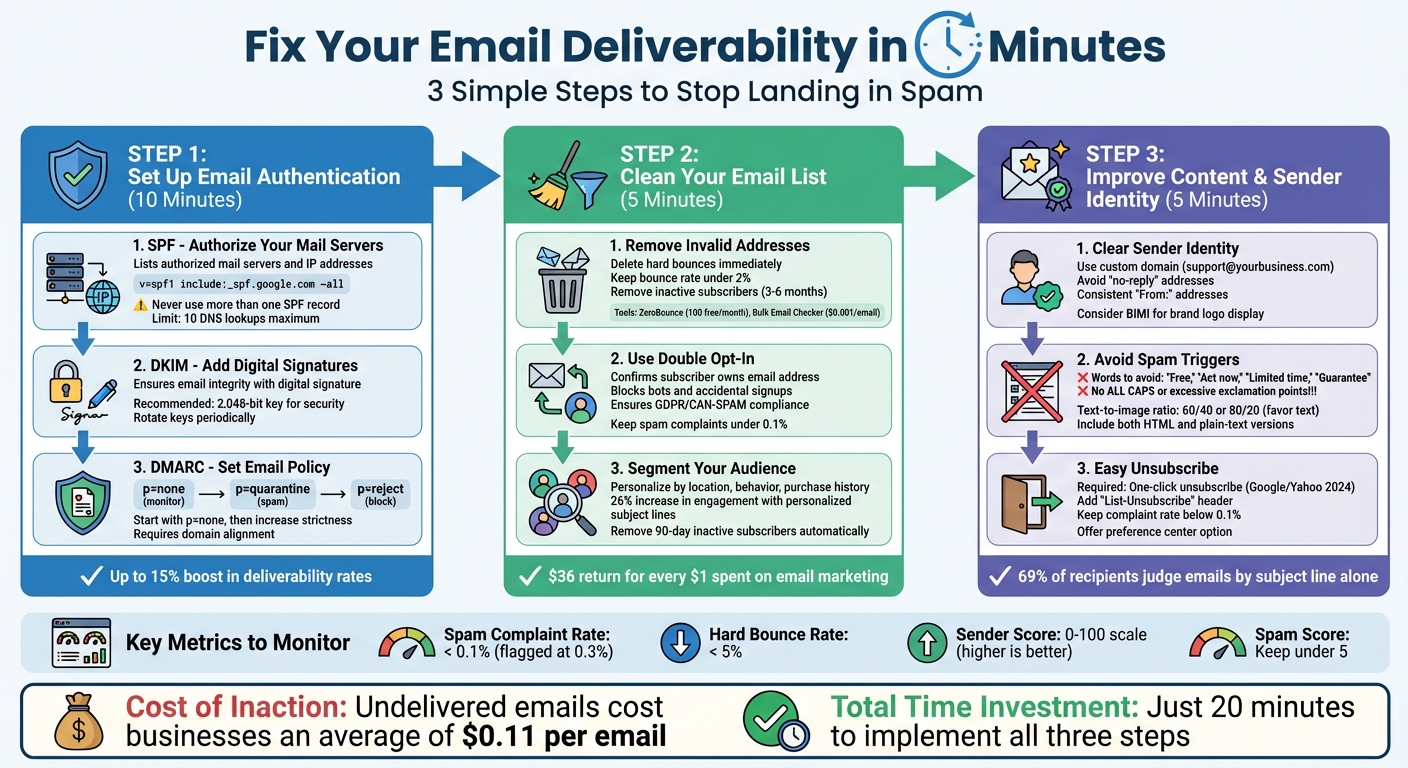
20-Minute Email Deliverability Fix: 3-Step Process
Why Your Emails Go to Spam (and How to Fix It for Good)
Step 1: Set Up Email Authentication (10 Minutes)
Email authentication is essential to prove that your emails are genuinely coming from you and not from someone impersonating your business. This process reassures mailbox providers and prevents your messages from being flagged as spam. It only takes about 10 minutes to configure email authentication by setting up three DNS records. Let’s walk through the steps, starting with SPF.
SPF: Authorize Your Mail Servers
SPF, or Sender Policy Framework, is a DNS record that lists which mail servers and IP addresses are authorized to send emails on behalf of your domain.
To set up SPF, log into your DNS management panel and add a TXT record. A typical SPF record might look like this:
v=spf1 include:_spf.google.com ~all
The ~all indicates a “soft fail”, which is helpful during testing. Once you’re confident everything is working correctly, you can change it to -all to enforce stricter rules.
It’s important to note:
- Never use more than one SPF record – multiple records will invalidate the setup.
- If you use multiple email services, combine their entries into a single SPF record.
- SPF has a limit of 10 DNS lookups. Exceeding this limit will cause the authentication to fail.
DKIM: Add Digital Signatures to Your Emails
DKIM, or DomainKeys Identified Mail, adds a digital signature to your emails, ensuring their integrity and verifying they haven’t been tampered with.
To configure DKIM, generate a key pair through your email provider. Then, add the public key to your DNS records using a specific selector, such as google._domainkey.yourdomain.com. Gmail recommends using a key of at least 1,024 bits, though 2,048 bits is a better option for security. Additionally, rotating your keys periodically enhances protection.
Once SPF and DKIM are in place, you’re ready to set up DMARC to manage your domain’s email policy.
DMARC: Set Your Domain’s Email Policy
DMARC (Domain-based Message Authentication, Reporting, and Conformance) works alongside SPF and DKIM to define how receiving servers should handle emails that fail authentication. This record lets you set policies such as:
p=none(monitor only)p=quarantine(send to spam)p=reject(block entirely)
Start with p=none to gather data and confirm that your legitimate emails are passing authentication. Once everything checks out, you can transition to stricter policies like p=quarantine and eventually p=reject for maximum security.
DMARC also requires “alignment”, meaning the domain in your “From” header must match the domain authenticated by SPF or DKIM. This alignment makes it much harder for spammers to spoof your email address.
Verify Your Setup
After configuring SPF, DKIM, and DMARC, test your setup using tools like MXToolbox or by sending a test email. Check the raw headers for an Authentication-Results line showing “pass” for all three protocols. Properly authenticated emails can boost your deliverability rates by up to 15% compared to unauthenticated messages.
Step 2: Clean and Optimize Your Email List (5 Minutes)
After securing authentication in Step 1, it’s time to focus on keeping your email list in top shape. A well-maintained list helps avoid deliverability problems and ensures your emails reach the right audience.
Remove Invalid and Inactive Addresses
Start by identifying and eliminating any email addresses that could hurt your deliverability. Hard bounces – which occur when emails fail to deliver due to invalid addresses – should be removed immediately. If your bounce rate exceeds 2%, mailbox providers may penalize you.
To stay ahead of this, use SMTP-based validation tools to confirm whether an email address exists before sending. For instance, Bulk Email Checker offers 10,000 validations for just $9.95 (around $0.001 per email), while ZeroBounce provides 100 free verifications each month and claims 99.6% accuracy. These tools can also flag risky addresses, such as those frequently reporting spam, disposable emails, or catch-all domains that accept all mail.
For added protection, integrate an Email Validation API directly into your signup forms. This ensures that emails are validated as they’re entered. Additionally, consider removing subscribers who haven’t engaged with your emails in 3–6 months.
Use Double Opt-In
Once you’ve cleaned up your list, make sure new subscribers are thoroughly verified. Double opt-in is a simple yet effective process where users confirm their email addresses after signing up. This step ensures that the person providing the email address actually owns it and is interested in your content. Plus, it weeds out bots and accidental signups, which can hurt your engagement rates.
“Rather than bringing over an old list, buying a list from someone, or scraping email addresses off social networks, senders need to create opportunities for people to provide their email addresses legitimately.” – Ashley Ortiz, Senior Email Delivery Consultant, Twilio SendGrid
Double opt-in also signals to mailbox providers that your emails are welcomed, which can help your domain avoid spam filters. Additionally, it ensures compliance with regulations like GDPR and CAN-SPAM by providing documented consent. Keep your spam complaint rate under 0.1% – Google flags anything above 0.3% as problematic.
Segment Your Audience
Sending the same email to everyone on your list is a recipe for trouble. Segmenting your list – based on factors like location, behavior, purchase history, or engagement level – lets you deliver more personalized and relevant content. This not only improves engagement but also reduces the likelihood of spam complaints. For example:
- E-commerce businesses can target users based on cart abandonment or average order value.
- SaaS companies can group subscribers by their stage in the sales funnel.
Personalized subject lines alone can increase engagement by 26%. Beyond that, segmentation allows you to send fewer emails to less-engaged subscribers, lowering your risk of complaints. Consider implementing a preference center where users can choose how often they hear from you and what type of updates they want.
Finally, use a sunset policy to automatically remove subscribers who haven’t opened an email in 90 days. This protects your sender reputation and keeps your list fresh. With email marketing delivering an estimated $36 for every $1 spent, maintaining a clean and segmented list isn’t just smart – it’s profitable.
sbb-itb-7459f5e
Step 3: Improve Email Content and Sender Identity (5 Minutes)
Once you’ve authenticated your domain and cleaned up your email list, it’s time to focus on your email content and sender identity. These elements play a huge role in building trust and professionalism. In fact, 69% of recipients decide to mark an email as spam based solely on the subject line.
Use a Clear Sender Name and Email Address
Your sender identity is one of the first things recipients notice. To build trust, always send emails from a custom domain, like support@yourbusiness.com, instead of free email providers. Avoid using “no-reply” addresses, as they discourage engagement and can hurt your credibility. If you’re using an @gmail.com address for business purposes, you’re not only increasing the risk of being flagged as spam but also missing out on proper authentication capabilities.
Consistency is key when it comes to your “From:” address. For instance, use sales@example.com for transactional emails like receipts and deals@example.com for promotional content. This helps both email providers and recipients categorize your emails correctly. Additionally, your display name should be clear and professional – something like “Jane from Solarmora” or “Solarmora Support” works much better than vague or spammy phrases like “URGENT REQUEST”.
For an extra layer of professionalism, consider implementing BIMI (Brand Indicators for Message Identification). This lets you display your brand logo directly in the recipient’s inbox, making your emails instantly recognizable.
Avoid Spam Trigger Words and Formatting
Spam filters are designed to analyze every detail of your email and assign it a spam score. If your score is too high, your email will end up in the junk folder. To avoid this, steer clear of high-pressure words like “Free”, “Act now”, “Limited time”, or “Guarantee.” Financial phrases such as “100% free” or “Money back” are also red flags for spam filters. Formatting choices matter too – don’t use ALL CAPS, excessive exclamation points, or misleading subject lines like “Re:” or “Fwd:” unless they are genuine replies.
Another important factor is your email’s text-to-image ratio. Stick to a balance of around 60/40 or 80/20 in favor of text. Emails that are entirely image-based often get flagged because spam filters can’t read image text. Also, avoid using link shorteners, JavaScript, or messy HTML code, as these can raise red flags. Always include both HTML and plain-text versions of your email to ensure deliverability.
And don’t forget – making it easy for recipients to opt out is just as important as crafting great content.
Include an Easy Unsubscribe Option
Providing a clear and simple way to unsubscribe is non-negotiable. Starting February 2024, Google and Yahoo will require bulk senders (those sending 5,000+ emails daily) to include a one-click unsubscribe option, with Microsoft Outlook following suit in May 2025. If recipients struggle to find your unsubscribe link, they’re more likely to mark your email as spam, which can seriously harm your sender reputation.
To simplify the process, add a “List-Unsubscribe” header. This allows users to opt out directly from their email client without needing to visit an external page. Keeping your spam complaint rate below 0.1% is critical – Google and Yahoo flag rates above 0.3% as a violation.
You might also want to offer a preference center where users can adjust their email frequency instead of unsubscribing entirely. For example, giving them the option to switch from daily to weekly emails can help you retain more subscribers.
“Don’t take unsubscribes personally. Sending to an unengaged audience hurts your sending reputation, so your recipient is doing you a favor by unsubscribing instead of ignoring your messages or marking them as spam.” – Twilio SendGrid
Monitor and Maintain Email Deliverability
Once you’ve tackled authentication, cleaned your lists, and optimized your content, the next step is to keep a close eye on your email performance. Email deliverability isn’t a one-and-done task – it requires constant vigilance. Even legitimate senders can face challenges, as many emails still fail to land in inboxes.
Here’s how to actively monitor key metrics and maintain strong deliverability over time.
Track Key Metrics
It’s important to distinguish between delivery (emails accepted by the server) and deliverability (emails reaching the inbox). To ensure you’re on the right track, focus on these critical metrics:
- Spam Complaint Rate: Keep this below 0.1%. Google and Yahoo flag anything over 0.3%, and even a rate of 0.08% can hurt your reputation.
- Hard Bounce Rate: This should stay under 5%. A higher rate signals poor list management and can damage your standing with ISPs.
- Sender Score: This score (ranging from 0 to 100) reflects your domain’s reputation based on factors like volume, complaints, and bounces.
To dig deeper, use tools like Google Postmaster Tools to monitor your domain’s reputation. These tools allow you to track spam rates, positive signals (like opens and clicks), and negative signals (such as unsubscribes or spam reports). For even more precision, Google’s Gmail Feedback Loop Identifiers can help identify which campaigns are driving complaints.
Use Deliverability Testing Tools
Before launching any major campaign, test your emails to catch potential issues early. Platforms like Mailtrap, GlockApps, and MailerCheck can verify your SPF, DKIM, and DMARC configurations, scan for spam triggers, and check if your domain is on any blacklists. Another effective method is seed testing, where emails are sent to test accounts across providers like Gmail, Outlook, and Yahoo to evaluate inbox placement.
In March 2025, Mailtrap used GlockApps to benchmark email service providers. The results revealed big differences: Postmark achieved 83.3% inbox placement, while SendGrid only managed 61.0%, with 20.9% of emails completely missing. Testing like this can uncover issues before they impact your actual campaigns.
Aim to keep your spam score under 5 when using these tools, as this is a strong indicator of high deliverability. Many testing platforms offer free options – Mailtrap, for example, provides 100 free tests per month, and GlockApps offers 2–3 free spam tests.
Maintain Consistent Sending Schedules
Spam filters closely monitor your sending habits. Sudden spikes in email volume – especially from new or dormant domains – can raise red flags. Internet Service Providers (ISPs) expect consistent, predictable sending patterns that align with subscriber preferences.
If you’re scaling up your email program, do it gradually. For example, don’t jump from sending 1 million emails to 5 million overnight. New IP addresses begin with no reputation and need to be “warmed up” by starting with low volumes and slowly increasing over time. Even established domains should avoid erratic sending patterns, as spam emails often show irregular bursts of high volume.
“Consistent volumes based on subscriber preferences are a key consideration for ISPs.” – Twilio SendGrid
One way to manage this is by giving subscribers control over how often they hear from you. Use a preference center to let them choose between daily, weekly, or other updates. Additionally, AI-powered tools can help optimize send times, ensuring your emails arrive when recipients are most likely to engage. This not only improves user experience but also keeps your sending behavior aligned with ISP expectations.
Conclusion
Key Takeaways
Getting your emails where they need to go – your recipients’ inboxes – requires a focused approach. It all starts with authenticating your domain, keeping your email list clean, and crafting optimized content. These four pillars – domain authentication, list hygiene, content optimization, and performance monitoring – are the foundation for better deliverability. And here’s a stark reminder: undelivered emails cost businesses an average of $0.11 per email. That might seem small, but it adds up fast when you’re sending thousands. By implementing these steps, you not only improve your delivery rates but also protect your brand’s reputation.
Start Fixing Your Email Deliverability Today
Take action today. Spend just 10 minutes setting up domain authentication, 5 minutes cleaning your email list, and another 5 minutes reviewing your content. These quick steps can make a big difference.
“You’re a guest in your subscriber’s inboxes, so respect what they have told you”.
Turbify‘s integrated email solutions are designed to help you manage your domain’s reputation and ensure consistent delivery. Whether you’re sending 100 emails or 100,000, these principles apply across the board. The sooner you start, the sooner you’ll see improvements in both inbox placement and audience engagement.
FAQs
How can I set up email authentication to keep my business emails out of spam folders?
Setting up email authentication is an essential step to ensure your business emails land in inboxes rather than being flagged as spam. The process is straightforward and involves configuring three critical records in your domain’s DNS settings:
- SPF record: This allows you to specify which servers are authorized to send emails on your behalf. You’ll do this by adding a TXT record like this:
v=spf1 include:your-email-provider -all. - DKIM record: This adds a cryptographic signature to your emails, enhancing their authenticity. To set it up, create a TXT record with your public key, usually named something like
default._domainkey.yourdomain.com. - DMARC policy: This helps define how to handle emails that fail SPF or DKIM checks. Publish a TXT record at
_dmarc.yourdomain.comwith a policy such as:v=DMARC1; p=reject; rua=mailto:postmaster@yourdomain.com.
After setting up these records, use an email authentication checker to verify everything is configured correctly. It’s also a good idea to regularly review DMARC reports to keep an eye on your domain’s email activity and make adjustments as necessary. These steps not only enhance your domain’s reputation but also improve the chances of your emails reaching their intended recipients.
What are the advantages of using a double opt-in for my email list?
Using a double opt-in process means subscribers must actively confirm they want to join your email list. This not only helps create a more engaged audience but also ensures compliance with legal standards like GDPR, which require clear and explicit consent.
By using double opt-in, you keep your email list cleaner by weeding out fake or invalid addresses. This reduces bounce rates and minimizes spam complaints, which in turn strengthens your sender reputation. A better sender reputation improves email deliverability, increasing the chances that your messages reach your audience’s inbox.
Why should you avoid using spam trigger words in your emails?
When you use spam trigger words in your emails, spam filters are more likely to flag your messages. This increases the chances of your emails landing in junk folders rather than inboxes. Over time, this can hurt both your email deliverability and your sender reputation.
To make sure your emails reach the right audience, stick to clear, professional language. Avoid using overly promotional or exaggerated phrases. For example, words like “free,” “urgent,” or “guaranteed” are common triggers. If you must use them, do so sparingly and only when they truly fit the context.