
Creating a website might seem overwhelming, but in 2026, it’s faster and easier than ever. With AI tools and user-friendly platforms, you can build a professional site in just a few hours – even without technical skills. Here’s the deal: your website is your 24/7 salesperson. Whether you’re selling products, generating leads, or showcasing your work, a well-built site can drive real results. Below, we’ll show you exactly how to plan, build, and launch your site step by step – without wasting time or money.
How to Make a Website | Step by Step [2026]
sbb-itb-7459f5e
Define Your Website’s Purpose and Goals
Before diving into platforms or domain names, start with the basics: What’s your main business goal? Who are you trying to reach? What action should visitors take when they land on your site?
Strategy first, design second.
That’s how Brianna Scott, Founder of Crearé Web Solutions, puts it [9]. Having a clear plan saves you from wasting time and second-guessing decisions. Try the 1-2-3 Goal Rule: jot down one main goal (like generating leads or selling products) and two secondary goals (such as growing an email list or showcasing customer reviews) [4]. For instance, a local plumber might focus on driving phone calls as the top goal, while also highlighting service areas and collecting email leads as secondary objectives.
Once you’ve nailed down your goals, think about who they’re for. Build a user persona with details like age, location, common challenges, and even their preferred device. This matters because about 65% of web traffic comes from mobile devices [3]. For example, if your audience is busy parents looking for quick meal solutions, your homepage should have easy navigation, bold fonts, and a standout "Order Now" button.
After defining your audience, map out their path through your site. A service business might guide visitors like this: Homepage → Services Page → Contact Form. An online store might follow this flow: Homepage → Product Category → Product Page → Checkout. Keep it simple – no more than three clicks. Research shows that 47% of users will leave if a page takes longer than 2 seconds to load [3]. Confusing layouts or slow load times can cost you visitors.
Your goals should shape every design and functionality decision. A freelance photographer’s portfolio site will need different features than a law firm’s lead-generation site. As web design expert Itamar Haim says:
The most successful websites are not just digital brochures; they are user-centric experiences driven by clear goals [4].
Write down your objectives and keep them front and center as you build your site.
Choose Your Website Building Platform
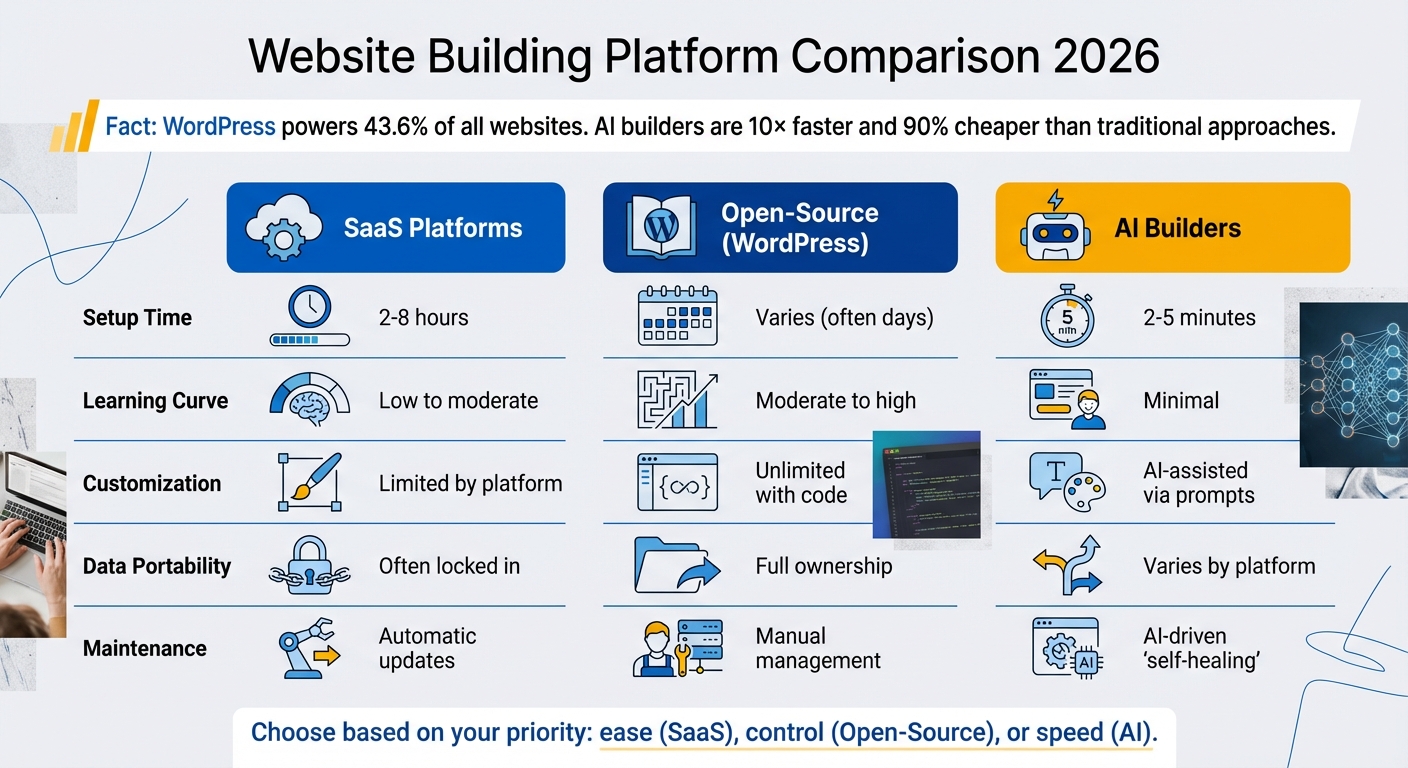
Website Building Platform Comparison: SaaS vs Open-Source vs AI Builders
In 2026, you’ve got three main options for building your website: closed SaaS platforms like Wix or Squarespace, open-source systems like WordPress, or hybrid models that combine managed hosting with customization options [10]. The right choice depends on whether you prioritize ease, control, or a mix of both.
SaaS platforms handle all the technical details for you but limit your ability to access or modify the underlying code. WordPress, which powers 43.6% of all websites, offers endless customization but comes with a steeper learning curve [12][13]. Hybrid platforms try to bridge the gap by offering managed hosting combined with visual tools, often appealing to those who want flexibility without the hassle of full control [10].
AI-powered builders are shaking things up. They’re estimated to be 10× faster and 90% cheaper than traditional approaches to website creation in 2026 [14]. Instead of spending hours tweaking templates, you can describe your needs in plain English and have a site generated in just 2–5 minutes [14]. Of course, these AI-generated sites may still need some manual adjustments to feel more polished or personal [16]. As Montana Thomas from Quick Sprout explains:
"Decent = ‘I’d send this to a potential customer today… and I can still grow on it six months from now.’" [16]
When deciding which platform to use, focus on what matters most to your business.
Compare Website Building Options
When comparing platforms, consider ease of use, performance, data ownership, and scalability. Here’s how some popular options stack up:
- Squarespace is often praised for its sleek templates and creative tools but offers limited flexibility [11].
- Wix provides over 900 templates and a robust plugin market, though it’s pricier and can feel less intuitive [11].
- Hostinger appeals to beginners with affordable pricing and built-in AI tools, though some features might require additional credits [11].
Performance-wise, platforms built on premium infrastructure like Google Cloud or AWS with integrated CDNs (content delivery networks) can improve your site’s speed and search engine rankings [10]. Security features like SSL certificates, regular backups, and uptime guarantees of at least 99.5% are must-haves [1]. Accessibility tools are also increasingly important due to stricter legal requirements, like the European Accessibility Act [10].
| Factor | SaaS Platforms | Open-Source (WordPress) | AI Builders |
|---|---|---|---|
| Setup Time | 2–8 hours [14] | Varies (often days) | 2–5 minutes [14] |
| Learning Curve | Low to moderate | Moderate to high [12] | Minimal [14] |
| Customization | Limited by platform | Unlimited with code | AI-assisted via prompts |
| Data Portability | Often locked in [10][13] | Full ownership | Varies by platform [15] |
| Maintenance | Automatic updates | Manual management | AI-driven "self-healing" [15] |
One key factor to check is whether you can export your content if needed. Some platforms, like WordPress-based 10Web, allow you to take your code with you, ensuring you’re not stuck if your business outgrows the platform [14][16].
While each option has strengths, many small businesses find hybrid or integrated solutions more practical.
Why Turbify Works Well for Small Businesses
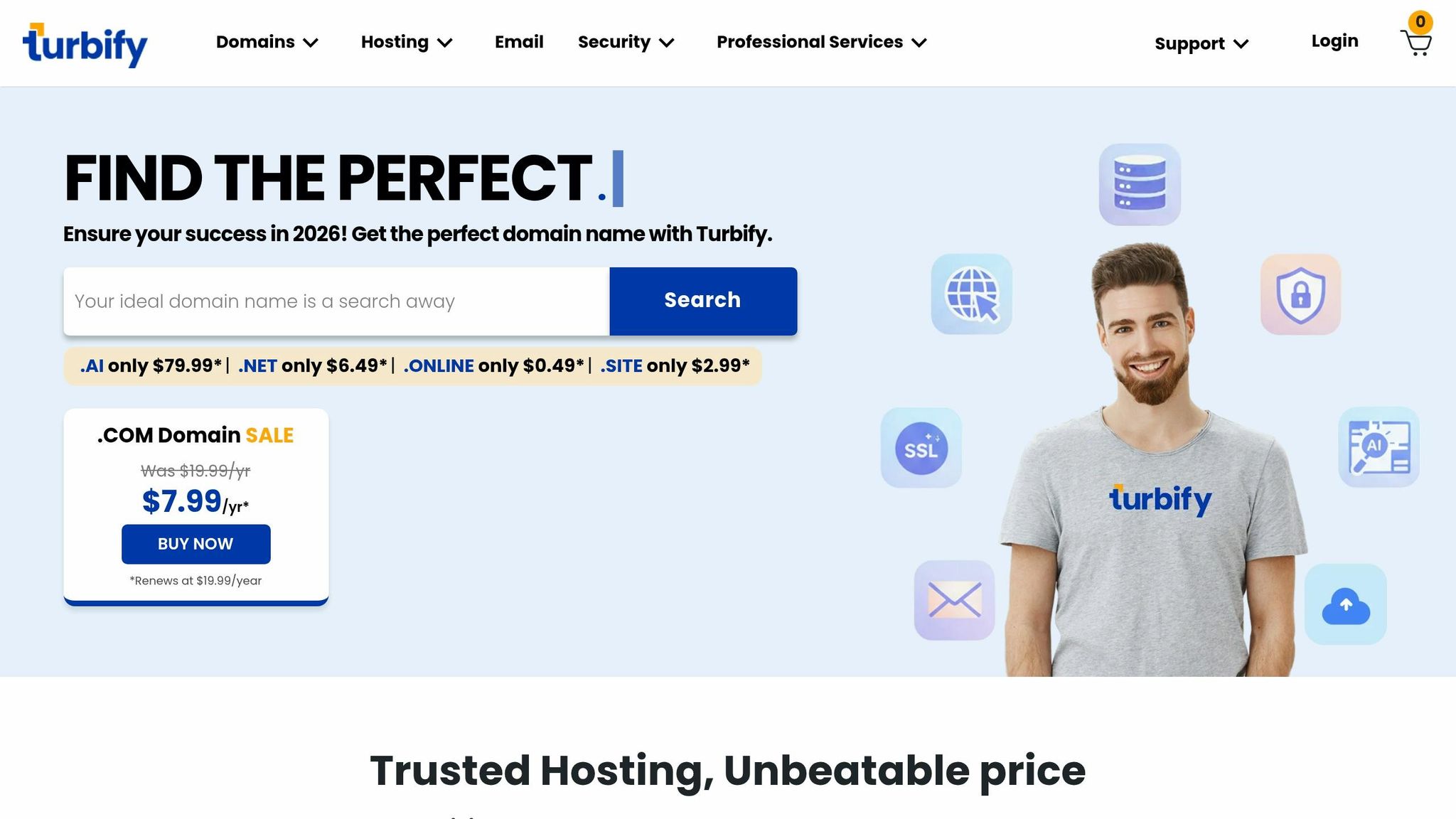
For small business owners who aren’t tech-savvy, the best platform simplifies management while supporting growth. Turbify stands out because it bundles essential tools like domain registration, hosting, and professional email into one package, all with a 99.9% uptime guarantee [18][19].
What makes Turbify different is its focus on non-technical users. Unlike Wix or Squarespace, it offers professional website design services where experts handle everything for you. For about $99 per month (plus a $499 setup fee), you can have a fully built site ready in 4–6 weeks. This is perfect if drag-and-drop editors feel overwhelming or you just don’t have the time to learn another platform [18][19].
Turbify also includes business-focused features like Localworks, which manages your business listings across 70+ directories to boost local SEO [19]. Email accounts come with a generous 1 TB of storage per account, and e-commerce plans start at $33.95 per month, offering secure shopping carts, real-time analytics, and shipping integration [18][19].
Register Your Domain Name and Set Up Web Hosting
Your domain name is your website’s address, while web hosting is where your site’s files are stored. When someone enters your domain, their browser connects to a server that delivers your website in milliseconds [20]. You need both set up before your site can go live.
Many platforms now bundle domain registration and hosting, automatically configuring DNS (Domain Name System) settings so your domain points to the right server. These packages simplify management by combining billing, renewals, and support into one account. Getting this setup right is a key step before launching your site.
How to Choose the Right Domain Name
Your domain name is like your online storefront – it should clearly reflect your business name and purpose. Stick to simple, professional names. Avoid hyphens, numbers, or overly niche terms that could limit your business’s growth or make it harder for people to remember.
Before registering, check for trademarks or similar business names to avoid legal complications. Many registrars now offer tools that suggest domain name ideas based on your industry keywords. While keyword-rich names (like "BestPlumber.com") might offer a slight SEO edge, memorable, brand-friendly names (like "Apple.com") are often easier to market and stick in people’s minds.
Standard extensions like .com usually cost $10–$20 per year [21]. Meanwhile, newer extensions like .ai have grown rapidly – from 40,000 registrations in 2020 to over 908,000 by 2025 [30, 33]. After registration, DNS propagation (the time it takes for your domain to become accessible worldwide) typically takes 2–6 hours but can occasionally take up to 48 hours [5]. While bundled plans handle these details for you, understanding DNS propagation helps ensure a smooth launch.
How Hosting and Domain Bundles Work
Pairing your domain with hosting makes managing your website easier. Your domain is the address visitors type in, while hosting is the space where your site’s content lives [21].
Bundled plans often include shared hosting, costing $2–$10 per month, and may even throw in a free domain for the first year. Look for packages with features like a 99.9% uptime guarantee, free SSL certificates (the padlock icon in your browser), automatic daily backups, and auto-renewal to prevent your domain from expiring. Since around 40% of users leave websites that take longer than 3 seconds to load [20], choose a host with high-speed SSD or NVMe storage and an integrated CDN (Content Delivery Network) for faster page delivery.
Turbify’s hosting plans offer a 99.9% uptime guarantee, free SSL certificates, and daily backups. Everything is managed through a single account, making it a great option for business owners who prefer a straightforward, no-fuss setup.
Select and Customize Your Website Template
Once your domain and hosting are ready, the next step is picking a template that suits your business. Most website platforms categorize templates by industry – think "Travel", "Bakery", or "Finance" – making it easy to start with a layout tailored to your field [1]. This saves time and ensures your site includes the sections your visitors expect.
Make sure the template aligns with your business goals and works well on mobile devices.
Identify your main objective first – whether it’s selling products, collecting leads, showcasing a portfolio, or sharing information. For example, an e-commerce template often features product grids and a smooth checkout process, while a service-focused template highlights contact forms and customer testimonials. Check that the template matches your industry and is optimized for mobile performance.
Look for templates with drag-and-drop editors instead of requiring custom code. This allows you to easily move sections around without needing technical expertise. If you need specialized features like booking tools or membership areas, ensure the platform supports these through plugins or apps. WordPress offers over 60,000 free plugins [4], while Wix and Squarespace have curated app marketplaces for added functionality.
Apply Your Business Branding
Start by uploading your logo in both PNG (for transparency) and SVG (for scalability) formats so it looks sharp on all screen sizes [23][24]. Most website builders allow you to adjust the placement and size of your logo visually. Next, set your color palette using specific Hex codes. Stick to one primary brand color and 2–4 accent colors to keep your design cohesive across all pages [22][24]. For instance, blue often conveys trust, making it popular for tech or finance businesses, while green signals growth and works well for eco-friendly brands [24].
Keep your font choices simple – limit them to 2–3 styles to avoid a cluttered look [22][24]. Use one font for headings and another for body text to establish a clear visual hierarchy. Test your color and font combinations on mobile devices to ensure readability; decorative fonts can be hard to read, and low-contrast colors can make text illegible [24][8]. To stay consistent, create a "Brand Kit" that includes your Hex codes and font names for future updates [22][24].
These branding steps help lay the foundation for a polished and cohesive website.
Build Your Site Structure and Core Pages
Once you’ve chosen your template, it’s time to build the key pages for your site. Start by organizing these pages around your main goals. A well-thought-out site structure helps guide visitors to take action. Begin by sketching a simple sitemap to outline clear connections between pages. This step ensures your website is easy to navigate and user-friendly.
Core Pages to Include
Every small business website needs a few essential pages to inform visitors and build trust. Let’s break down what those are:
- Homepage: Think of this as your digital welcome mat. Use a hero section with a bold headline and a clear call-to-action (like "Shop Now" or "Request a Free Quote"). In 300–500 words, explain what you offer, why it matters, and include trust signals like testimonials or logos of brands you’ve worked with.
- About Us: This page should introduce your company’s story, mission, and values. Use 500–800 words to connect with visitors on a personal level. Adding team photos can make your business feel more relatable and credible.
- Services or Products: Provide a detailed overview of what you offer. If you have multiple services, create separate pages for each to help with search engine visibility. Aim for 800–1,200 words per page, focusing on how your offerings solve problems or add value.
- Contact Page: Make it easy for customers to reach you. Include a simple form, your email, phone number, physical address with a map, and business hours. Since 82% of customers expect a response within 10 minutes of reaching out [3], ensure your contact details are highly visible.
- Legal Pages: Don’t skip the Privacy Policy and Terms of Service. These are often legally required, and they also reassure visitors that their data is safe.
If you plan to share updates or insights, consider adding a Blog or Content Hub. This can help position you as an expert in your field and improve your search engine rankings.
| Page Type | Recommended Length | Key Elements |
|---|---|---|
| Homepage | 300–500 words | Value proposition, hero image, CTAs, trust signals |
| About Page | 500–800 words | Company story, mission, team photos, values |
| Service Pages | 800–1,200 words | Benefits, process, pricing, individual details |
| Contact Page | Minimal copy | Form, phone, email, map, business hours |
Once your core pages are ready, focus on making navigation smooth and intuitive.
Set Up Navigation Menus
Navigation menus are like roadmaps for your visitors. Place your primary navigation menu in the header and keep it simple. Standard categories include Home, About, Services, Blog, and Contact. If you offer multiple services, use dropdown menus under a main "Services" tab to organize sub-pages.
Legal links, like Privacy Policy and Terms of Service, can go in the footer. With nearly 65% of web traffic coming from mobile devices [3], ensure your menu is mobile-friendly. Buttons should be at least 44×44 pixels, and text should be easy to read. Finally, test your navigation on both desktop and mobile to confirm everything works as it should.
Add Content and Integrate Key Features
Once your site’s pages and structure are in place, it’s time to add content and features that make it functional and engaging. Use short paragraphs, clear subheadings, and bullet points to keep your copy easy to read. Include high-quality images, but compress them first – converting them to WebP format can shrink file sizes by 25–30% without losing quality [3]. This is crucial because nearly half of users (47%) will leave a site if it takes more than 2 seconds to load [3].
Interactive features can also enhance usability. Add a simple, well-labeled contact form that confirms submissions with an instant success message. Multi-step forms can improve completion rates by breaking down longer processes. Make your phone number click-to-call for mobile visitors. Also, install Google Analytics early to track traffic sources and visitor behavior.
Next, let’s look at how to set up e-commerce features if you plan to sell online.
Set Up E-Commerce Features
If you’re selling products or services, e-commerce functionality is a must. Start by creating product listings with zoomable images and short, benefit-focused descriptions. Use a secure payment gateway like Stripe or PayPal to ensure safe transactions. Set up shipping options – flat-rate, real-time carrier quotes, or free shipping thresholds – and automate tax calculations based on location.
Make sure your customers can find and purchase products easily. A good rule of thumb is to ensure any product is accessible within three clicks [25]. Adding security badges and a checkout progress bar can build trust and guide buyers through the process. Before launching, run a test order to ensure everything works smoothly. Platforms like Turbify’s WooCommerce hosting offer built-in tools for secure payments, shipping management, and inventory syncing – perfect for small businesses that need straightforward solutions.
Once your e-commerce setup is ready, focus on making your site visible to potential customers.
Optimize for Search Engines
Search engine optimization (SEO) helps your site rank higher in search results. Stick to one H1 heading per page, keep titles under 60 characters, and write meta descriptions between 150–160 characters. Don’t forget to add alt text to all images [8]. For local businesses, including your address in the footer and embedding a Google Map on your contact page can help improve local search rankings.
An SSL certificate (the lock icon in your browser’s address bar) is essential for both credibility and SEO. Set up daily automated backups and include a privacy policy if you collect user data. These steps not only protect your site but also build trust with visitors. If you’re using Turbify hosting, you’ll get free SSL certificates, daily backups, and 24/7 support – letting you focus on growing your business instead of worrying about technical upkeep.
Test Across Devices and Optimize for Mobile
With over 64% of web traffic coming from mobile devices [3], your website needs to function seamlessly on smartphones and tablets – not just desktops. A good starting point is your browser’s developer tools. In Chrome or Firefox, press F12 to open these tools and switch to Responsive Mode. This lets you preview your site at various screen widths: 375px for small mobile, 390–414px for standard mobile, and 768px for tablets [26][28].
While these tools are helpful, they can’t catch everything. Testing on real devices is critical to spot issues like awkward touch gestures or iOS Safari’s auto-zoom when tapping text fields [26][28]. To prevent iPhones from zooming unnecessarily, ensure input font sizes are set to 16px or larger [28]. Also, check that clickable elements are large enough to meet usability guidelines [3][28].
For a broader testing approach, platforms like BrowserStack or LambdaTest allow you to simulate thousands of device and browser combinations [26][27][29]. Don’t stop at just viewing your site – try completing key tasks, like placing a test order, to confirm that essential processes like checkout work smoothly on mobile.
Next, use Google PageSpeed Insights to measure mobile performance. Aim for a Largest Contentful Paint (LCP) of 2.5 seconds or less and an Interaction to Next Paint (INP) under 200 milliseconds [28][1]. Keep in mind that a 2-second load time can lead to 47% of users abandoning your site, and every extra second may cut conversions by 7% [3][27]. If you’re on Turbify hosting, your site already benefits from infrastructure designed for speed, but it’s still wise to double-check that your images are compressed and your code is efficient.
Once you’re confident in your site’s mobile performance, you’ll be ready to launch and start driving traffic.
Launch Your Website and Promote It
Before going live, double-check everything – links, navigation, and spelling. Test your site in multiple browsers like Chrome, Safari, and Firefox to catch any quirks [2][5]. Skipping this step can lead to frustrating technical issues, which happens to about 67% of beginners [5]. Once you’re confident everything is working, hit publish and visit your domain in an incognito browser to confirm it’s live [5]. After that, it’s time to focus on tracking and promotion.
If your domain and hosting are from different providers, you’ll need to update your domain registrar’s nameservers. Keep in mind that DNS changes can take up to 48 hours to fully update [5][7]. Install Google Analytics right away to monitor traffic, bounce rates, and visitor behavior from day one [2][5].
When it comes to promotion, focus on three key areas: SEO, social media, and email marketing. For social media, stick to the 80/20 rule – 80% of your posts should educate or help your audience, while only 20% should promote your business [30]. Build an email list by offering lead magnets like checklists or discount codes. Multi-step forms can increase leads by up to 27% [30][3]. Unlike social media followers, your email list is entirely yours, making it a reliable way to stay connected even if algorithms change [30].
To boost your SEO efforts, use Google Search Console alongside Analytics to monitor keywords and fix indexing issues [6][3]. Speed up the process by manually submitting your XML sitemap [1][5]. As Itamar Haim, SEO Team Lead at Elementor, wisely points out:
You can have the best-looking website in the world, but if Google can’t find it, you’ve built a billboard in the desert [30].
These steps set the stage for a website that not only looks great but also performs well over time.
Maintain and Update Your Website
Launching your site is just the beginning – keeping it secure and running smoothly requires ongoing maintenance. Regularly back up your site, update plugins and software (especially for WordPress users), and refresh your content to stay relevant in search rankings [5][7][4]. For WordPress sites, aim to update the core software monthly and check plugins every two weeks to avoid vulnerabilities [3].
Use tools like Google PageSpeed Insights or GTmetrix weekly to catch and fix speed issues before they hurt your traffic [2][5]. Updating your content regularly also signals search engines that your site is active, helping you maintain visibility in search results.
FAQs
Which website platform is best for my small business?
The best platform for your small business in 2026 will depend on what you’re looking for and how comfortable you are with tech. Wix and Squarespace are great for beginners, offering simple drag-and-drop tools, customizable templates, and everything included – like hosting and e-commerce features. If you want more flexibility and room to grow, WordPress is a solid choice, but it does take more effort to set up and manage. For most people without technical experience, AI-driven platforms like Wix or Squarespace make getting started quick and hassle-free.
How much should I budget to build and run a website?
The cost of creating and maintaining a website in 2026 varies widely based on your choices. A simple DIY website can run you about $100–$200 per year, covering domain registration (around $10–$25 annually) and hosting ($40–$150 annually).
If you opt for website builders like Squarespace or Wix, expect to spend between $200 and $2,000+ per year, depending on the features and design options you choose. On the higher end, a fully custom-designed website could cost as much as $56,000, though smaller-scale custom work might come in under $1,000.
Your budget should reflect your specific needs and the complexity of your site.
What should I do before launching my site?
Before your website goes live, a little planning can make a big difference. Start by defining what your site is for and setting clear, measurable goals. Who’s your audience? Understanding them will shape everything from design to content.
Pick a domain name that represents your brand well – something memorable and relevant. Next, choose a reliable web hosting service to keep your site running smoothly. Finally, map out your site structure. Include key pages like About and Contact to ensure visitors can easily find important information.
These steps lay the groundwork for a website that not only looks good but also works effectively to meet your goals.