
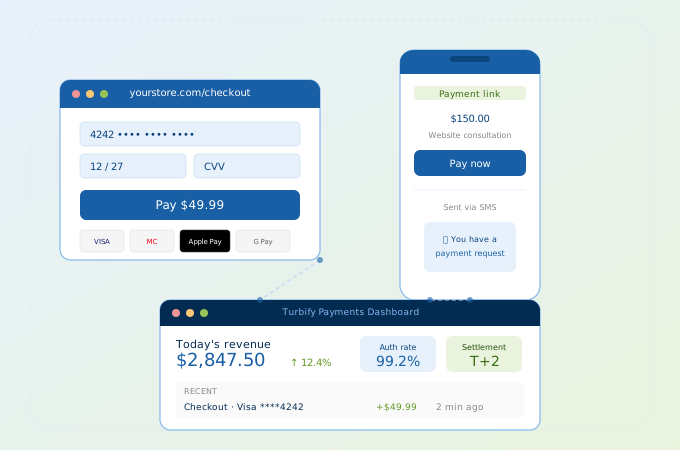
You need to take money from customers online. That means you need a payment gateway, a checkout experience, and a bank account to deposit into. Most small businesses can go from zero to accepting their first payment in a single afternoon.
This guide walks through every method: embedded checkout, hosted payment pages, and payment links you can send by text. We use Turbify Payments as the reference platform throughout, since it covers all three methods from one dashboard.
What You Need Before You Start
Before you compare platforms, get four things in order.
A registered business. Payment processors verify your business during onboarding. Have your EIN (or SSN if you’re a sole proprietor), legal business name, and business address ready. Turbify Payments collects this in one short form. No multi-page applications or notarized documents.
A business bank account. This is where your funds settle. Most banks open business checking in 1–2 days. Personal accounts technically work with some processors, but they create accounting headaches and can trigger deposit holds.
Your selling channel. Here is the part most guides get wrong: you do not need a website to accept payments online. Turbify Payments offers payment links that work over email, SMS, or social media. No website required. If you do have a site or plan to build one, you will want a checkout integration.
An SSL certificate. Required for any website with a checkout form. SSL encrypts the connection between your customer’s browser and your server. It’s the lock icon in the address bar. If you’re hosting with Turbify, SSL is included free on every plan. One less thing to configure.
Three Ways to Accept Payments (And When to Use Each)
There is no single right method. Most businesses end up using two or three depending on how they sell. Turbify Payments supports all three through one account, so you are not juggling separate logins or reconciling data across platforms.
1. Integrated Checkout: Best for Online Stores
A checkout form embedded directly into your website. Customers add items to a cart, enter their card or tap Apple Pay / Google Pay, and pay without leaving your site.
Choose this if you sell products or services through a website and want a branded, professional buying experience.
How it works with Turbify Payments: You install a plugin for your ecommerce platform (WooCommerce, for example, which Turbify also hosts) or use the API for a custom build. Card data goes directly to Turbify’s PCI Level 1 infrastructure. It never touches your server. That keeps you out of the heaviest PCI compliance requirements automatically.
This is where Turbify’s ecosystem becomes an advantage. If you’re already using Turbify for hosting and domains, adding Turbify Payments means your website, domain, and payment processing are managed through one company. No third-party duct tape.
Setup time: 1–4 hours with a plugin. A few days for custom API integrations.
2. Hosted Payment Page: Best for Getting Started Fast
A pre-built checkout page that Turbify Payments hosts for you. Add your logo and brand colors, and you have a professional payment page ready in under 30 minutes. No developer, no code.
Choose this if you want to start collecting payments today. You link to the page from your website, your email signature, or anywhere else. Customers pay on the hosted page and get redirected back.
Setup time: Under 30 minutes.
3. Payment Links: Best for Service Businesses and Invoicing
A unique, secure URL that takes the customer to a payment form. You create the link in your Turbify Payments dashboard, set the amount, and send it however you want. Email, text, Instagram DM, or printed on an invoice as a QR code.
Choose this if you’re a plumber sending an invoice after a job. A consultant billing a client. A caterer collecting a deposit. A personal trainer taking payment for a session package. Any scenario where there is no shopping cart involved.
How it works with Turbify Payments: Open the dashboard, create a payment link, enter the amount and description, and send. The customer clicks, pays with a card or digital wallet, and you get a notification. The transaction shows up in your dashboard alongside every other payment you’ve collected. Checkout sales, hosted page sales, everything in one view.
Setup time: Under 5 minutes per link.
Quick Comparison: Which Method Fits Your Business?
| Integrated Checkout | Hosted Payment Page | Payment Links | |
|---|---|---|---|
| Best for | Online stores with a cart | Fast setup, no developer | Service businesses, invoicing |
| Website required? | Yes | No (but helps) | No |
| Setup time | 1–4 hours | Under 30 minutes | Under 5 minutes |
| Branding control | Full | Logo + colors | Minimal |
| Development needed? | Plugin or API | None | None |
| PCI burden on you | None (Turbify handles it) | None | None |
| Apple Pay / Google Pay | Yes | Yes | Yes |
| Shows in Turbify dashboard | Yes | Yes | Yes |
The last row matters more than most people realize. When checkout sales, hosted page payments, and payment links all feed into the same dashboard, your bookkeeping, refunds, and dispute management happen in one place. Not three.
What the Turbify Payments Dashboard Actually Does
Most payment guides skip over the operational side. But after your first 50 transactions, the dashboard becomes the tool you live in.
Transaction search and filtering. Find any payment by amount, date, card type, or status. Useful when a customer calls and says “I paid last Tuesday” and you need to confirm it in 10 seconds.
Settlement visibility. See exactly what is landing in your bank account and when. Turbify Payments settles on a T+2 cycle. Money from Monday’s sales hits your account by Wednesday. The dashboard shows pending settlements, completed deposits, and line-item breakdowns.
Refunds in one click. Full or partial refunds with an audit trail. No calling a support line or filling out a form. Your support team and your finance person both see the same refund record.
Chargeback management. When a customer disputes a charge, the dashboard shows the dispute, the deadline to respond, and a queue for uploading evidence. Most small businesses lose chargebacks by default because they miss the response window. Turbify sends alerts so you don’t.
CSV exports and reporting. Pull transaction reports filtered by date range, payment method, or status. Export to CSV for your accountant or for month-end reconciliation. No copying and pasting from three different platforms.
User roles. Give your bookkeeper read-only access. Give your operations manager refund permissions. Do not share one admin password across the team.
How Intelligent Payment Routing Saves You Money
This is a feature most small business owners do not know to ask about. It directly affects your bottom line.
When a customer pays with a debit card, there are often multiple networks that can process the transaction. Visa’s network is one option. Debit networks like STAR or NYCE are others. These networks charge different rates. Intelligent payment routing automatically steers eligible transactions toward the lowest-cost network, especially on debit and multi-rail cards.
You do not configure anything. You do not even see it happening. Turbify Payments handles the routing decision at authorization, and you get the cost benefit automatically.
This is the kind of optimization that large retailers have had for years. Turbify Payments brings it to small and mid-sized businesses on the same platform. No enterprise contract required.
Payment Methods Your Customers Expect
Offering more ways to pay means fewer abandoned carts. Here is what Turbify Payments supports and why each matters.
Credit and debit cards. Visa, Mastercard, American Express, Discover, plus international cards. This covers the vast majority of online transactions.
Apple Pay and Google Pay. Digital wallets reduce checkout friction dramatically. The customer authenticates with a fingerprint or face scan instead of typing 16 digits. Mobile conversion rates improve measurably when wallets are enabled. Turbify Payments supports both through integrated checkout and hosted pages.
ACH bank payments. Lower processing costs than cards (typically under 1%), making this ideal for B2B invoicing, recurring billing, or high-ticket purchases. Available through Turbify Payments for direct debit.
BNPL (Buy Now, Pay Later). Coming soon to Turbify Payments. Customers split purchases into installments. You get paid in full upfront. If your average order is above $75, BNPL typically increases both conversion rate and order size. When it launches, it will be available through the same dashboard as everything else.
Understanding the Fees
Payment processing has three cost layers. Most providers obscure them. Here is the plain version.
Interchange goes to the customer’s bank. Set by card networks (Visa, Mastercard), ranging from 1.5% to 2.5% depending on card type and transaction method. You do not control this.
Assessment fees go to the card network itself. Small: usually 0.13% to 0.15%. You do not control this either.
Processor markup is what your payment gateway charges on top. This is the only part you can shop.
Turbify Payments bundles all three into one flat rate: 2.9% + 30¢ per transaction. No setup fees. No monthly fees. No PCI compliance surcharge. No “non-qualified transaction” upcharges.
| Sale Amount | Processing Fee | You Keep | Effective Rate |
|---|---|---|---|
| $25 | $1.03 | $23.97 | 4.1% |
| $50 | $1.75 | $48.25 | 3.5% |
| $100 | $3.20 | $96.80 | 3.2% |
| $250 | $7.55 | $242.45 | 3.0% |
| $500 | $14.80 | $485.20 | 2.96% |
The per-transaction fee ($0.30) matters most on small orders. If your average sale is under $10, ask about custom pricing. Turbify offers tailored rates for high-volume merchants.
For businesses processing significant volume, Turbify Payments also offers custom pricing with a dedicated account manager, volume discounts, and flexible pricing models. You can get a rate estimate based on your actual volume at turbifypayments.com/contact.
How Security Works (Without You Thinking About It)
This is where choosing the right gateway pays for itself. The wrong choice means you are managing security yourself.
PCI DSS Level 1 certification. Turbify Payments is certified at the highest level of PCI compliance. Their infrastructure has been independently audited for how it stores, processes, and transmits card data. When you use Turbify’s checkout, hosted pages, or payment links, card data flows through their certified infrastructure. Never through your servers.
What this means for you: the most demanding PCI requirements are handled on Turbify’s side. You fill out a simplified self-assessment questionnaire instead of managing a full security program.
Tokenization. When a customer enters their card number, Turbify replaces it with a random token immediately. The real card number is stored in Turbify’s secure vault. Even if someone intercepted the transaction data, they would get a meaningless string.
Fraud scoring at authorization. Turbify Payments scores every transaction in real time using risk algorithms. High-risk transactions get flagged or challenged. Legitimate orders sail through. You are not manually reviewing every sale. The system handles it, and you see the results in your dashboard.
3D Secure (3DS). For transactions that trigger additional risk signals, the customer’s bank adds an authentication step. A one-time code or biometric check before approving the charge. This reduces fraud and shifts chargeback liability from you to the issuing bank.
The bottom line: if you use Turbify Payments, you are not building a security program. You are inheriting one that has already been audited to the highest standard.
Setting Up Turbify Payments: Step by Step
1. Sign up at turbifypayments.com. Fill in your business details: legal name, EIN or SSN, address, and bank account for deposits. The form is designed for speed. No multi-page applications.
2. Get verified. Turbify verifies your identity and business. Most businesses are approved within 1–2 business days.
3. Choose your checkout method. Integrated checkout for your online store, hosted payment page for fast launch, payment links for invoicing. Or all three. You configure them from the same dashboard.
4. Add your branding. Upload your logo, set your colors. This applies to hosted payment pages and customer-facing receipts.
5. Run a test transaction. Use test mode to process a payment, issue a refund, and check that settlement reports look right. Make sure confirmation emails are working.
6. Go live. Switch to live mode and accept your first real payment.
7. Set up alerts. Configure notifications for successful payments, failed transactions, chargebacks, and settlements. The dashboard supports email alerts so you do not need to log in every time.
The Turbify Stack: Payments + Hosting + Domains + Email
Here is something no standalone payment processor can offer. If you are building your online presence from scratch, Turbify can handle all of it.
Turbify Hosting for your website. Shared hosting, WordPress hosting, or WooCommerce hosting with 99.9% uptime, daily backups, free SSL, and 24/7 support. Plans start around $9/month.
Turbify Domains for your web address. Register and manage your domain with privacy protection, DNS management, and domain locking. From $1.99/year.
Turbify Business Email for professional email at your domain. yourname@your-site-here.net instead of a Gmail address.
Turbify Payments for accepting payments. Everything covered in this guide.
One company. One support team. A WooCommerce store on Turbify hosting, with a Turbify domain, professional email, and Turbify Payments processing checkout is a fully integrated small business stack.
Common Mistakes to Avoid
Choosing a processor based only on rate. A gateway that charges 2.5% but lacks fraud protection will cost you more in chargebacks than the 0.4% you “saved.” Look at the total cost, including disputes, monthly fees, and PCI surcharges.
Ignoring mobile wallets. Over 60% of ecommerce traffic is mobile. If you do not support Apple Pay and Google Pay, you are asking customers to type 16 digits on a phone screen. Many will not.
Using disconnected tools for different payment types. If your checkout is with one provider, your invoicing is with another, and your reporting lives in a spreadsheet, you are spending hours reconciling what should be one dashboard view. This is exactly what Turbify Payments is designed to eliminate.
Skipping chargeback alerts. You typically have 7–14 days to respond to a dispute with evidence. No alerts means you lose by default. Turbify Payments sends notifications and tracks deadlines in the dashboard.
Not testing refunds before launch. Everyone tests payments. Almost nobody tests refunds. Process a test refund before you go live so you know the customer experience and the audit trail both work.
Your Next Step
Pick the method that matches how you sell today.
Selling through a website? Set up integrated checkout, especially if you are already on WooCommerce with Turbify hosting.
Need to start fast with no dev work? Launch a hosted payment page in under 30 minutes.
Taking orders by phone, email, or in person? Create your first payment link in under 5 minutes.
Not sure yet? Start with Turbify Payments and you will have all three available from the same account as your business evolves.
No monthly fees. No setup fees. PCI Level 1 security. Settlement in two business days. Get a rate estimate based on your volume at turbifypayments.com/contact.
FAQ
How much does it cost to accept payments online with Turbify Payments?
Standard pricing is 2.9% + 30¢ per successful transaction. No setup fees, no monthly fees, no PCI surcharges. Custom pricing with volume discounts is available for higher-volume businesses.
Do I need a website to use Turbify Payments?
No. Payment links let you collect money via email, text, or social media. No website needed. A hosted payment page gives you a branded checkout URL without building a site. If you do want a website, Turbify also offers hosting starting at ~$9/month.
How long until I get paid after a customer makes a purchase?
Turbify Payments settles funds on a T+2 schedule. Money from Monday’s sales reaches your bank by Wednesday. Settlement details are visible in the merchant dashboard.
Is Turbify Payments secure?
Turbify Payments is PCI DSS Level 1 certified, the highest security standard in the payments industry. Card data is tokenized, transactions are fraud-scored in real time, and sensitive data never touches your servers.
Can I use Turbify Payments with my existing WooCommerce store?
Yes. Turbify Payments offers plugins and integrations for ecommerce platforms. If you are running WooCommerce on Turbify hosting, the integration is especially straightforward. Same ecosystem, same support team.