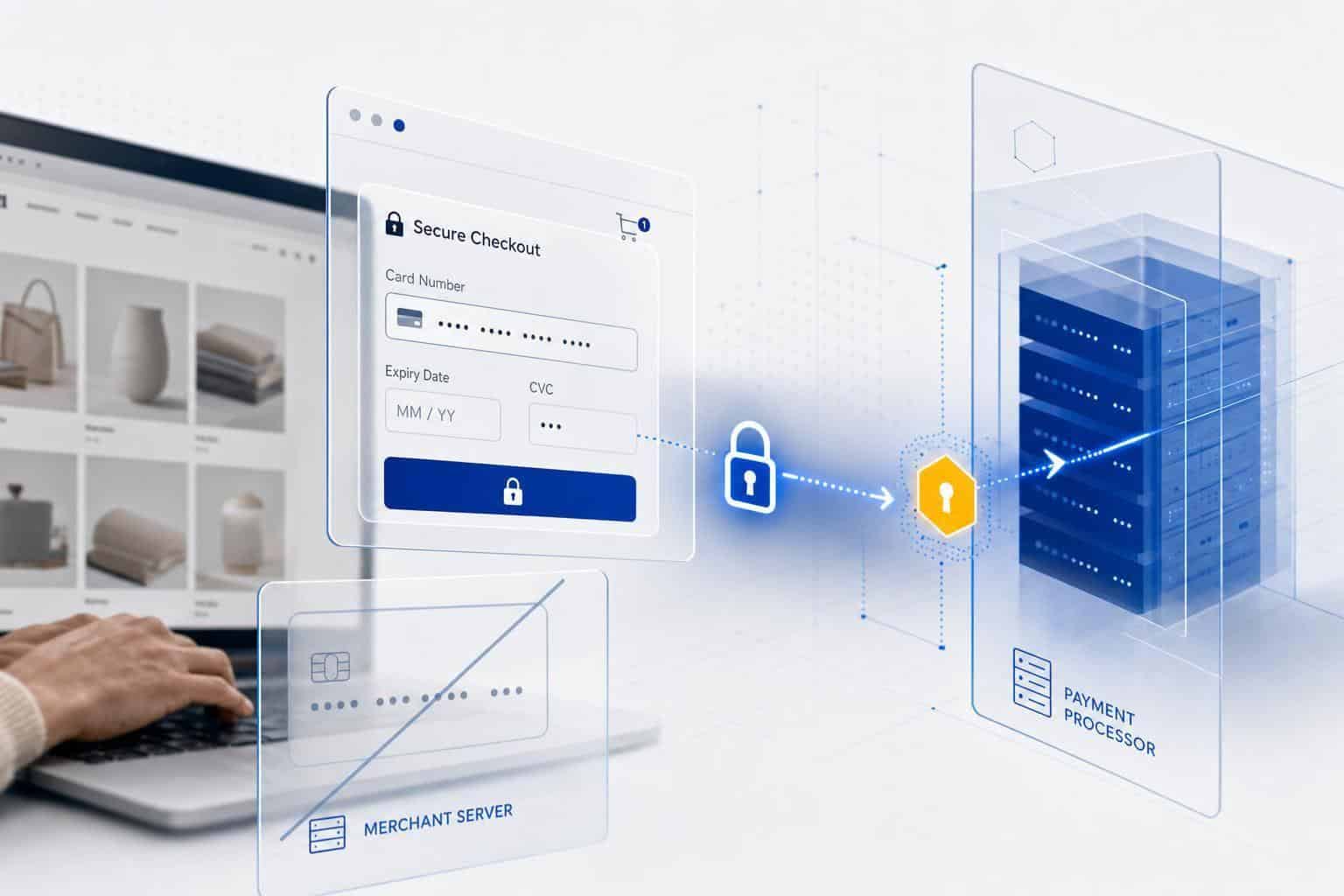
If you take card payments, the big question is simple: where does the card data go, and who is on the hook for protecting it? The short answer is this: your payment processor can shield most of the risk only if card data stays off your server. Below, I’ll show you what processors handle, what still falls on you, and the setup that keeps your PCI work lighter.
Payment processors protect card data in three main ways: TLS while data moves, tokenization after payment, and locked-down storage for the card data they keep. That cuts your exposure, but it does not remove your PCI DSS duties.
The line that matters most is this: if raw card data touches your site, app, logs, or staff tools, your risk jumps fast. If it doesn’t, your setup is simpler and your yearly PCI checklist is shorter.
Here’s the plain-English version of the data rules. Cardholder data includes the card number, cardholder name, expiration date, and service code. Sensitive authentication data includes CVV, full track data, and PIN data – and that data must never be stored after approval.
Processors lower risk first by keeping card data encrypted during checkout. TLS – the security layer behind the lock icon and https:// – scrambles the data while it moves from the customer’s browser to the payment system. You should expect TLS 1.2 or higher across every payment page.
The safer setup for most small businesses is to avoid handling card data at all. That usually means either a hosted checkout page or embedded payment fields – small card-entry boxes on your page that come straight from the processor’s servers. In both cases, the raw card number skips your server.
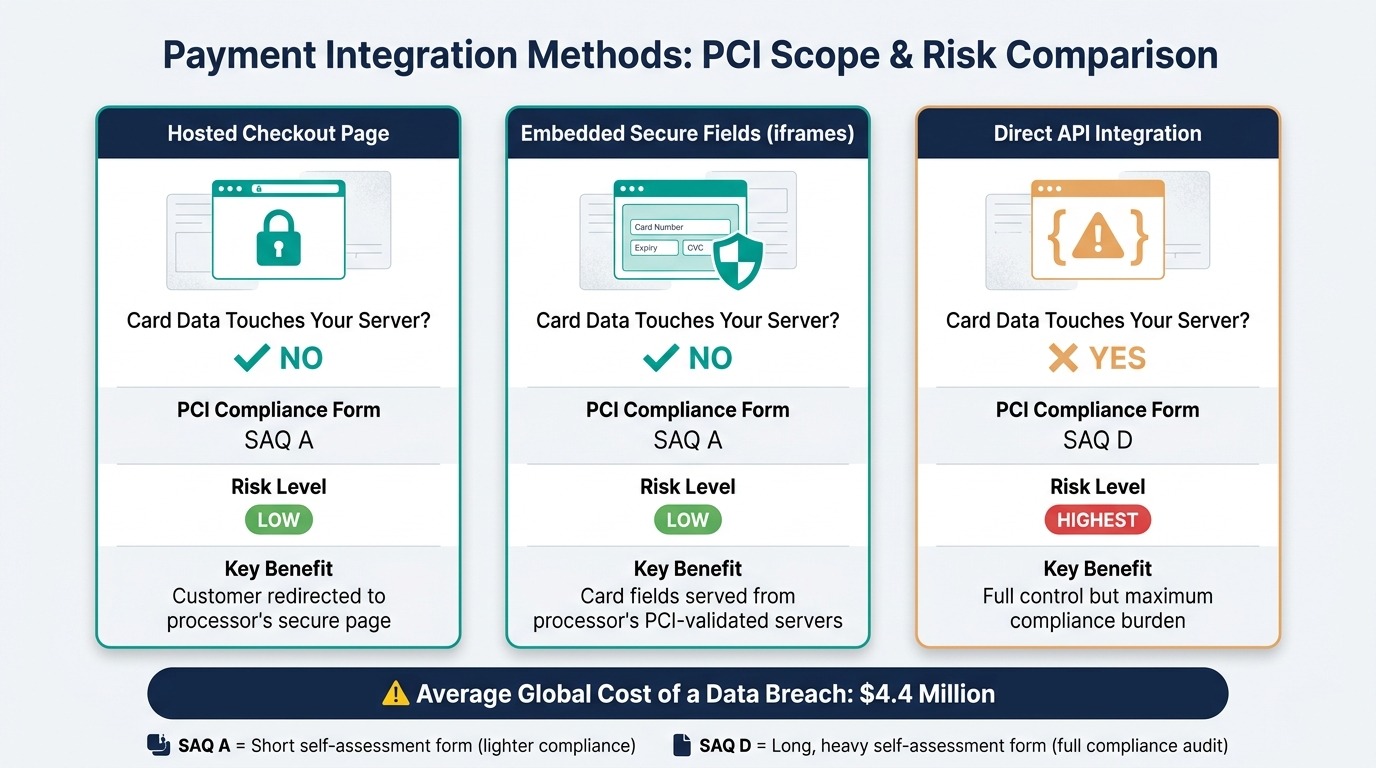
That setup matters because PCI scope changes based on data flow. If the processor hosts the card fields, many merchants can use SAQ A, which is the short PCI self-assessment. If your server receives card data directly through an API flow, you’re usually looking at SAQ D, which is much heavier.
After payment, processors cut storage risk with tokenization. A token is a stand-in value for the card number, so your system can handle refunds, saved cards, or subscriptions without storing the real number. Your processor keeps the actual card in a PCI-reviewed vault, and you keep the token.
Processors also protect stored data with encryption at rest. Many use AES-256, which means the stored card data is scrambled and can’t be read without the right key. Those keys should be stored apart from the data, rotated on a set schedule, and limited to a small number of approved staff.
Access control matters just as much as encryption. Good processors use role-based access control, which means staff access is tied to their job, plus least privilege, which means people get only the access they need. Some also require two people to approve access to key systems and keep logs that show who did what and when.
Your processor handles a big part of payment security, but not all of it. You still need to fill out the right PCI form each year, keep your systems patched, and make sure raw card data is not landing in places like databases, support tools, screenshots, or server logs.
That last point trips up a lot of small businesses. A checkout page may be fine, but a phone-order process, debug log, CRM note, or email thread can still pull card data into your systems. Once that happens, your compliance burden can grow fast.
If you want the lowest-risk path, I’d keep the rule simple: pick a checkout flow where card data never touches your server. Hosted checkout pages and embedded secure fields are the right choice for most small business sites because they cut both risk and PCI workload.
A few facts put the stakes in perspective. The article notes that the average global cost of a data breach was $4.4 million. No small business plans for a hit like that, and most can’t absorb it.
So what should you do next? Start by mapping your payment flow from the checkout form to storage, logs, support tools, and any call-in order process. Then ask one direct question: “Does card data hit my server at any point?”
If the answer is yes, switch to hosted checkout or embedded fields. If the answer is no, confirm your site uses TLS 1.2+, use processor-issued tokens for recurring billing, and finish the PCI self-assessment that matches your setup.
Payment Integration Methods: PCI Scope & Risk Comparison
How Payment Processors Protect Data During Transmission
Payment processors protect card data in two main ways at checkout: TLS during transit and hosted or embedded payment fields. That means the card number is scrambled while it travels, and in many setups, it never passes through your server at all.
That second part matters a lot. If raw card data never touches your systems, your risk drops and your PCI paperwork gets much lighter.
Encryption in Transit with TLS
TLS encrypts card data before it leaves the browser. In plain English, it turns the data into unreadable text so anyone who intercepts it can’t make sense of it.
You can spot this by checking for HTTPS and the lock icon in the browser. Any payment site should use HTTPS with an active TLS certificate, and modern setups should require at least TLS 1.2 while blocking older insecure versions.
The next thing to check is simple: does that card data ever reach your server? If it does, your compliance load goes up fast.
Hosted Checkout Pages and Secure Payment Fields
The safest path for most small businesses is to let the payment processor collect the card details. That’s why many processors use hosted checkout pages or secure embedded fields.
With a hosted checkout page, the customer is sent to a page run by the processor. With embedded secure fields – also called iframes, which means the card boxes show on your site but come from another server – the payment fields appear on your page but are served straight from the processor’s PCI-validated servers.
In both setups, raw card data never reaches your server. That’s the big win.
Hosted checkout and embedded fields often qualify merchants for SAQ A, while direct card handling usually requires SAQ D compliance. [1]
| Integration Method | Raw Data Touches Merchant Server? | PCI Compliance Burden |
|---|---|---|
| Hosted checkout page | No | Lowest (SAQ A) |
| Embedded secure fields (iframes) | No | Low (SAQ A) |
| Direct API integration | Yes | Highest (SAQ D) |
If you’re choosing a payment setup, start by asking your processor whether they offer hosted checkout or embedded secure fields. That one choice can save you a lot of risk and a lot of compliance work.
How Payment Processors Protect Data After Capture
Stored payment data is the next big risk after a card is accepted. Data in storage needs a different kind of protection than data moving between systems.
Think of it this way: protecting data in transit is like sealing a letter before you mail it. Protecting data at rest is like locking that letter in a safe after it arrives.
How Tokenization Replaces Stored Card Numbers
Tokenization keeps real card numbers out of your system. Instead of storing the actual card number, the processor swaps it with a random token that means nothing outside that processor’s system.
The processor keeps the real card data in a PCI-compliant vault – a locked-down storage system built to meet payment security rules. Your system only gets the token.
That matters for things like recurring billing, refunds, and saved payment methods. When a customer comes back or a subscription renews, you send the token to the processor, and the processor matches it to the original card in the vault to finish the payment.
Network tokens can also cut failed payments when cards expire or get reissued. That helps keep subscriptions running and saves you from chasing down updated card details.
After processors limit what gets stored, they protect the vault itself with encryption and tight access rules.
Encryption at Rest and Access Controls
Encryption at rest protects the card data that still has to be stored. Tokenization handles what gets stored. Encryption at rest protects how that stored data is kept safe.
Processors encrypt vaulted card data with AES-256 – a common encryption standard used to scramble data so it can’t be read without the right key. They store those encryption keys separately in a key management service, which is a system built to control and protect keys.
Keys are rotated on a regular schedule, too. That means no single key stays in use long enough to become a weak point.
Processors also limit who can get near sensitive data in the first place. RBAC – role-based access control – means access is tied to a person’s job. Least privilege means staff only get the minimum access they need to do that job.
Some systems add dual control, which means two people must approve access to encryption keys. That’s a strong check against internal fraud.
Processors also log access so there’s an audit trail showing who accessed what and when. If you’re reviewing a provider, ask how they handle tokenization, key storage, access rules, and audit logs before you move on to PCI responsibility.
What PCI DSS Requires and What It Means for Your Business
PCI DSS sets the rules for card security, and your payment processor does not take care of all of them for you. Your processor handles part of the job, but your business still has work to do.
PCI DSS is the card security standard set by major payment brands for any business that accepts, processes, or transmits card data. [1]
What Processors Handle
Processors handle the heavy lifting on the payment side. That includes secure infrastructure, encryption, tokenization, and regular security checks.
This split matters because it shapes your checkout setup. The less card data that touches your website, computer, or network, the less risk you carry.
What Merchants Are Still Responsible For
Using a processor does not make your business automatically compliant. You still need to complete the right annual SAQ and keep your own systems secure. [1]
That means you should never store CVV codes, PINs, or raw card numbers. It also means keeping your computers and routers patched, which just means installing security updates when they come out. [4]
For recurring billing, use processor tokens instead of saving card details yourself. A token is a stand-in value your processor gives you, so you can bill a customer again without keeping their actual card number on your system. [4][5]
Your next move is simple: check how your checkout works, confirm which SAQ applies to your setup, and make sure no card data is landing on your systems unless it has to.
How to Reduce Risk When Choosing a Payment Setup
Pick a setup where card data never touches your server. That one choice cuts your risk fast and keeps your PCI work – the payment security paperwork and checks – much lighter.
If card details pass through your server, you take on more responsibility. If they don’t, you avoid a lot of that exposure.
Choose Tools That Limit Your Data Exposure
Use hosted payment pages or embedded fields. They keep card data off your server, which is the safer path for most small business sites.
Tools like Stripe Elements or Turbify’s checkout host the card fields on the processor’s servers, even while the customer stays on your site. To your customer, it feels like one smooth checkout. Behind the scenes, the card data skips your server.
Here’s the simple rule to use when you compare options:
| Integration Type | Card Data Touches Your Server? | PCI Burden |
|---|---|---|
| Hosted Payment Page | No | SAQ A |
| Embedded Fields (iframes) | No | SAQ A |
| Direct API | Yes | SAQ D |
SAQ A is the lighter PCI form. SAQ D is the long, heavy one. For most small businesses, that makes hosted pages and embedded fields the clear pick.
When you’re reviewing checkout tools, ask one direct question: Does card data hit my server at any point? If the answer is yes, move on unless you have a strong reason not to.
Use an Integrated Platform Like Turbify When Simplicity Matters
If you want fewer moving parts, use an integrated platform like Turbify. Fewer systems usually means fewer places for something to break or slip through the cracks.
The bigger risk for many small businesses isn’t fancy hacking. It’s a messy setup with too many disconnected tools. One tool for hosting, another for store management, another for payments, and maybe a plugin in the middle – that’s where problems start.
Turbify bundles website hosting, ecommerce, and payments into one platform with one dashboard. That makes it a solid fit for small businesses that want a simple checkout without custom compliance work.[2]
Your next step is simple: check your current payment flow and map where card data goes. If your server is anywhere in that path, switch to hosted checkout or embedded fields.
What to Do Next to Make Your Payment Process Safer
First, find out if card data ever touches your server. That single check tells you how much PCI work you’re on the hook for.
Map Where Payment Data Flows Today
Trace the full payment path from checkout to storage. Look at your checkout form, web server, connected apps, logs, databases, debugging tools, and any phone-order process.
Check for raw card data at every step. If full card numbers show up anywhere in that path, your PCI scope gets much bigger fast. [1][6]
That means you should look beyond the website itself. A support tool, a server log, or a call-in order process can pull you into a much bigger compliance burden.
If any part of the flow touches raw card data, fix the checkout flow next.
Switch to Lower-Risk Payment Handling Options
If your review shows direct card data exposure, move to hosted checkout pages or embedded payment fields. Those options cut your PCI scope down to SAQ A – the shortest self-assessment form for merchants that fully outsource card handling. [1][2]
For recurring billing, use processor tokens instead of storing card numbers yourself. A token is a stand-in value from your payment provider, so your system charges the card without holding the card number. [3]
For subscriptions or saved cards, tokenization is the right move. It keeps card data with the payment processor, not in your database.
Over the next 30 days, do four things:
- Map your payment flows
- Switch exposed checkout points to hosted fields
- Audit who has access
- Complete your PCI SAQ
If you need a default choice, pick hosted checkout or secure payment fields and make that change first.
Conclusion: Key Points to Remember About Payment Processor Security
Keep card data out of your systems whenever you can. That gives small businesses the best protection, and it cuts down your PCI work at the same time.
Payment processors lower risk with TLS in transit – the security layer that protects data as it moves – plus hosted or embedded payment fields and encryption for stored data. That means the processor handles the heavy lifting on the back end, while you avoid having raw card details touch more of your site than needed.
Your part still matters. You choose the integration, complete the right PCI self-assessment, and make sure card data never ends up in logs or databases.
That choice affects both your risk and your workload. A hosted or embedded checkout usually means less exposure, fewer headaches, and a simpler setup for a small business site.
Your next move is straightforward:
- Use hosted or embedded payment options
- Confirm TLS 1.2 or higher is active across your site
- Use processor-issued tokens for recurring billing or saved payment methods
If you want an all-in-one option, Turbify bundles ecommerce and payments tools in one platform. Pick the setup that keeps sensitive data from flowing through, being stored in, or living on your systems any longer than it has to.
FAQs
How do I know if card data hits my server?
Check your payment form first. If you use hosted payment fields, card data goes straight from the customer’s browser to the payment processor’s secure system. It never passes through your server.
That setup cuts your PCI DSS work by a lot. You’re not storing or touching card data on your own system, which keeps your risk lower.
If your checkout form collects card details directly, those details pass through your server. That puts you in charge of sensitive data and triggers stricter PCI DSS rules.
The difference is simple: hosted fields mean less risk and less compliance work. A direct card form means more responsibility on your side.
Your next step is to ask your developer or payment provider one direct question: Does card data ever touch our server? If the answer is yes, plan for tighter PCI DSS controls.
What PCI form applies to my checkout setup?
The right PCI Self-Assessment Questionnaire (SAQ) depends on how your checkout collects card data. That’s the part that matters most.
If payment details are entered through a secure hosted field or iframe, like Turbify Payments, your server usually does not handle that sensitive card data. That setup can make PCI work simpler and may let you use a shorter form, such as SAQ A.
You still need to confirm the setup with your payment provider. Forms like SAQ A, A-EP, or D are based on how your site interacts with cardholder data, so the exact integration method decides which one applies to you.
Can tokenization replace PCI compliance?
No. Tokenization does not replace PCI compliance.
It can shrink your PCI DSS scope by swapping sensitive cardholder data for tokens. That means your systems handle less live card data, which lowers risk and can cut down the amount of card data you must protect.
But tokenization is a support tool, not a replacement. You still need to meet the core PCI DSS rules for protecting payment data. If you’re using tokenization now, the next step is simple: review which systems still touch card data and confirm they meet PCI DSS requirements.